


Dataverse is the core data platform that serves as the foundation for Dynamics 365 and Power Platform solutions; it is responsible for storing and managing business data. Like any cloud-based data storage service, it has defined limitations, and exceeding these limits can negatively impact system management and operational flexibility.
In this article, we will briefly discuss how storage space is allocated, outline the potential consequences of exceeding capacity limits, and present several architectural strategies for minimizing the risk of exceeding them. The goal is to support the design of systems that, from the early stages of their lifecycle, will be easier to scale, more cost-effective, and easier to maintain.
Dataverse Limits
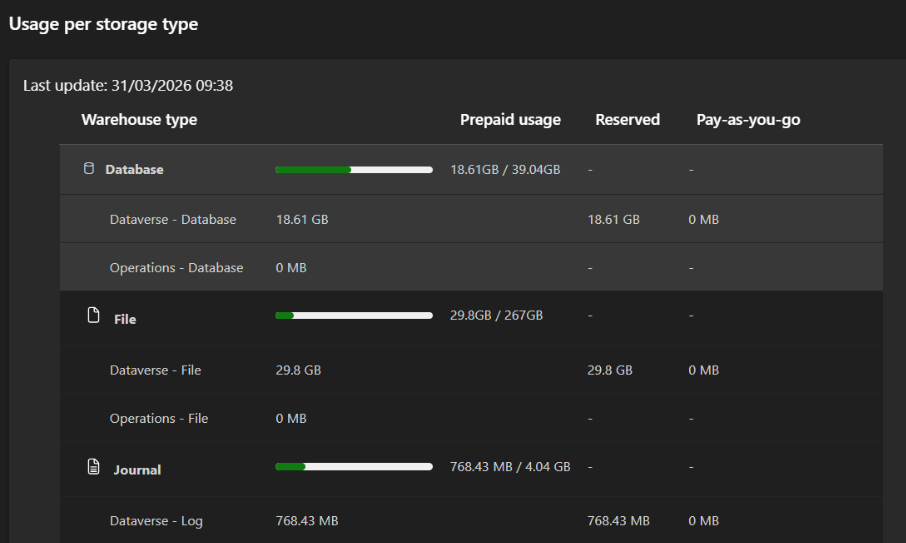
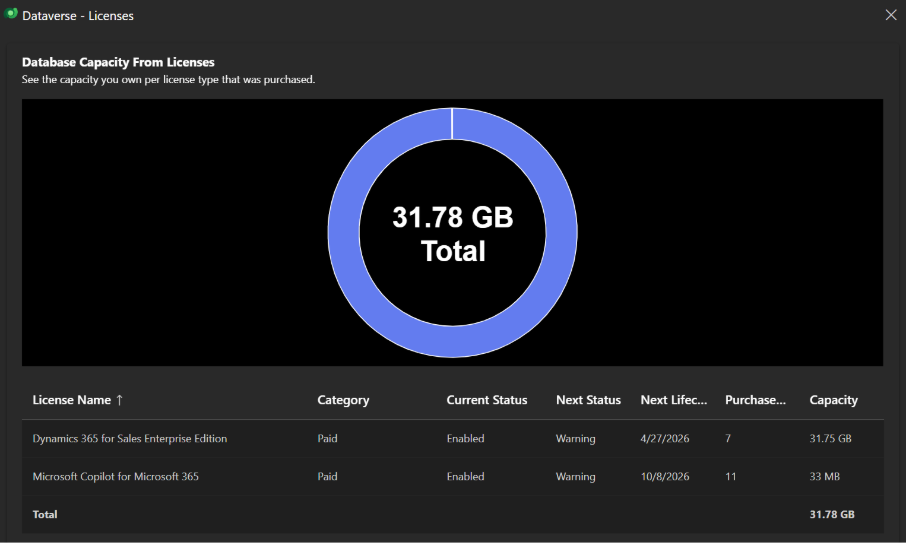
First, it’s important to note that Dataverse storage capacity is allocated based on the licensing model and the number of users. For example, with a Dynamics 365 Sales Enterprise license, a tenant receives 30 GB of Dataverse database storage and an additional 250 MB for each licensed user.
It’s also worth noting that Dataverse distinguishes between three types of storage— database storage, file storage, and log storage—each of which has its own limits and specific use cases. From an architectural perspective, this distinction is crucial when designing scalable solutions.
Overall, the available base capacity turns out to be small, especially for systems that store large amounts of data or are used over a long period of time.
Exceeding Limits
As we noted earlier, in many cases these limits are low and can easily be exceeded. When this happens, Microsoft notifies us via email—assuming we are the owners of the environment.
According to the official documentation, once the limit is exceeded, certain operations become unavailable, such as:
- creating a new environment,
- Restoring an existing environment from a backup.
There is no clear information regarding any negative impact on the availability or operation of services that are already active. However, from the perspective of an engineer specializing in this field, the restore operation is particularly important and may be needed at any time. Therefore, the ability to perform such operations should always be available.
Overrun Risk Management & System Architecture
Purchasing Additional Space
The simplest, but also the least optimal, solution is to purchase additional database space—1 GB costs $40 per month.
Keep in mind, however, that such an expansion may prove insufficient in the long run, and you will most likely need to purchase additional space more than once during the system’s lifetime.
External Database
The first solution that comes to mind—and one that is more advanced than the previous ones—is storing data in an external database. The Azure platform offers many different types of databases that can be easily integrated using Microsoft connectors. This makes data operations relatively easy to implement, for example, using Power Automate flows and the connectors we mentioned earlier.
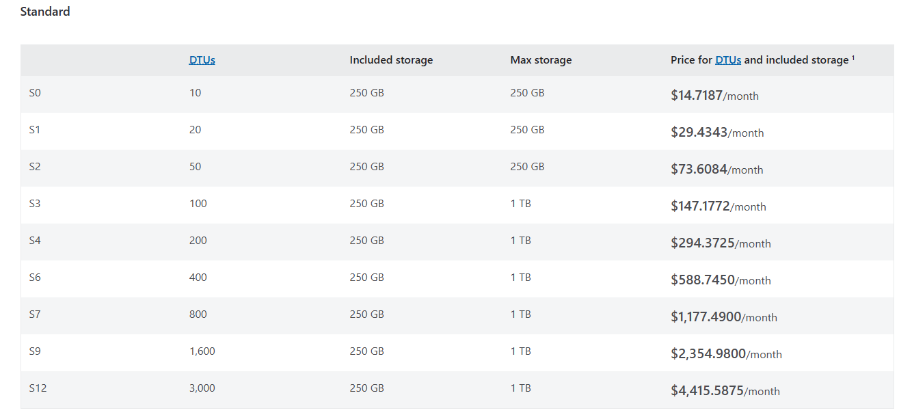
It’s worth noting that the costs of databases in Azure are significantly lower than the cost of additional Dataverse storage. For example, an SQL database with 10 DTUs (Database Transaction Units, which are units that determine the resources available to the database) and a maximum size of 250 GB in the Standard pricing plan costs approximately $14.70 per month. This configuration is sufficient for many basic business requirements.
Virtual Tables
Another good architectural approach for Dynamics 365 applications is to use virtual tables. This data is not physically stored in Dataverse, so it does not count toward storage limits. Instead, it is retrieved in real time from an external source. From the user’s perspective, working with virtual tables is no different from working with standard Dataverse tables. However, it’s important to note that they have certain technical limitations and work best for entities that aren’t part of complex business logic. For example, data from virtual tables cannot be used in plugins, which limits the ability to implement advanced server-side logic.
SharePoint
If your system and business processes involve working with many files, you should consider using SharePoint instead of storing them directly in file fields. This solution is natively integrated with Dynamics 365. However, it’s important to note that this approach may not work well if a complex access permissions model is required. It’s also worth keeping in mind that this solution has capacity limitations.
Azure Blob Storage
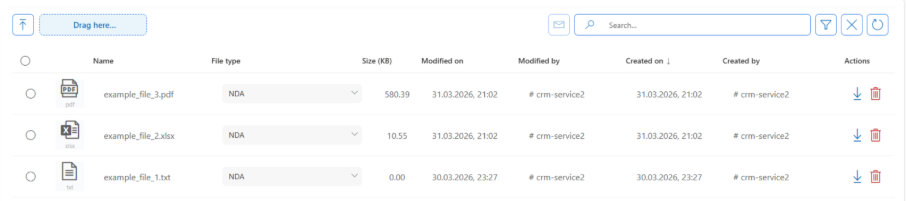
The previous option works well, but only in limited scenarios. A more flexible and scalable approach is to use the Blob Storage component in a Azure Storage Account. Thanks to a custom PCF control, files can be processed directly from any entity form in the application Power Apps. In our case, the custom PCF control was created by my colleague Rafał from oneDynamics and integrates with the previously mentioned data source. This solution is particularly valuable because it offershigh scalability and can be adapted to complex business processes. In many cases, this is the most flexible and practical approach.
Periodic Data Deletion
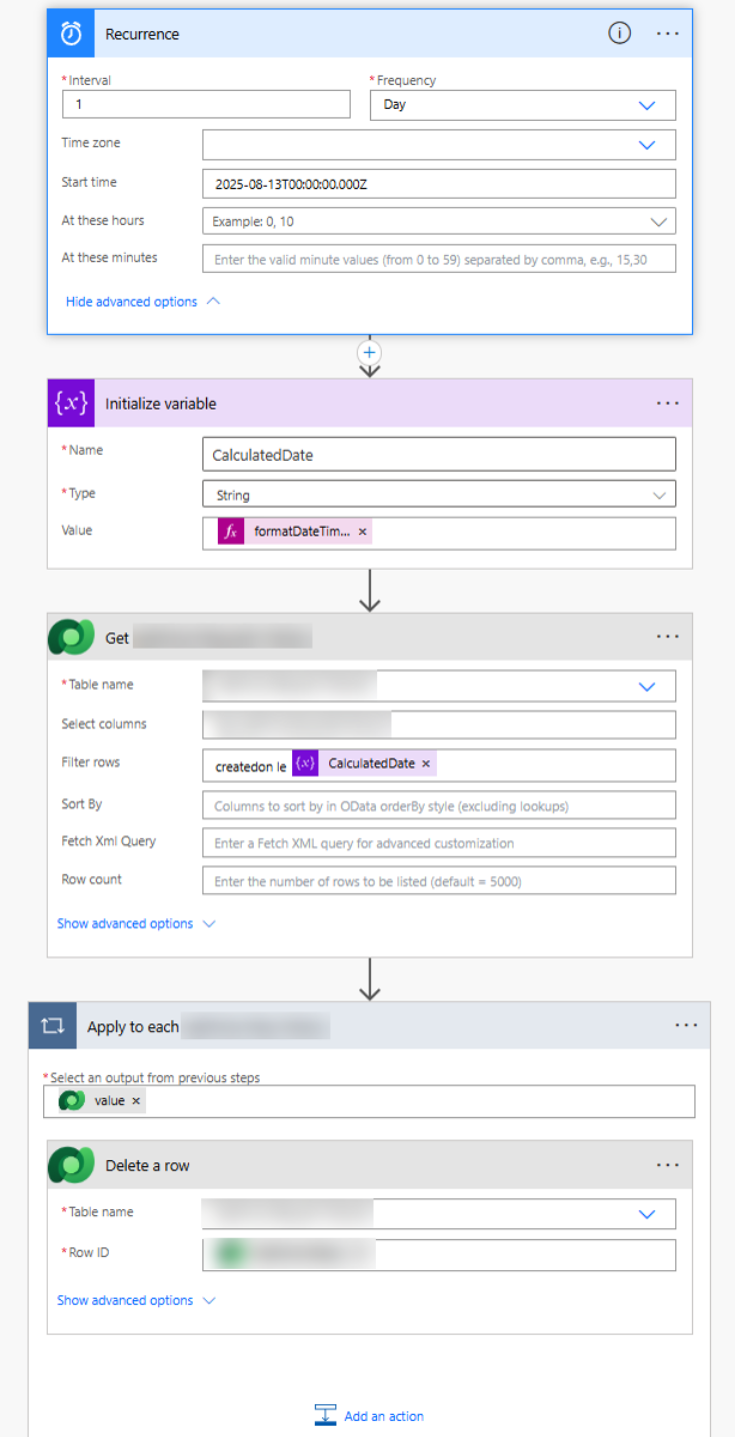
Another possible solution is to periodically delete data. These days, data is often compared to gold. In my experience, however, some data loses its value over time, so continuing to store it in the database is unnecessary. It is therefore crucial to clearly define which data can be deleted and, of course, after how long.
Once these rules are established, we need a mechanism to handle the deletion. It is recommended to create a workflow Power Automate that will periodically retrieve records meeting specific conditions and delete them. Implementing such a process is extremely simple, even for non-technical users.
Brief Summary
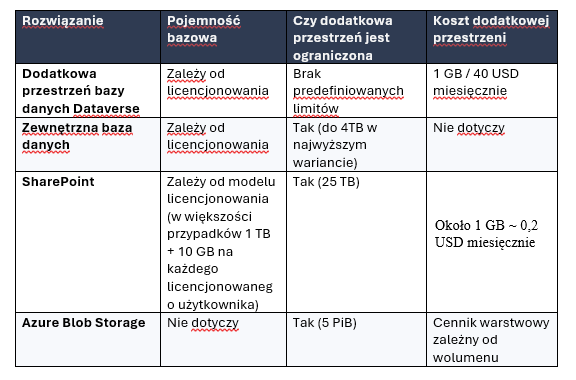
As you can see, there are several ways to deal with Dataverse capacity limitations. Of course, these are not the only possible options. The table below summarizes the key technical aspects of the proposed solutions.
If you have any questions about the article above or would like us to review your specific situation and find the best solution for you, please contact us by email.
Sources:
1. https://learn.microsoft.com/en-us/power-platform/admin/capacity-storage
2. https://www.microsoft.com/en-us/power-platform/products/power-apps/pricing
3. https://learn.microsoft.com/en-us/power-apps/developer/data-platform/virtual-entities/get-started-ve
4. https://azure.microsoft.com/en-us/pricing/details/storage/blobs/
5. https://azure.microsoft.com/en-us/pricing/details/azure-sql-database/single/
Exceeding Dataverse capacity limits may prevent you from performing key administrative operations, including restoring the environment from a backup. Therefore, as early as the system design phase, it is worth considering storing some data outside of Dataverse—for example, in Azure SQL or Azure Blob Storage—rather than relying solely on purchasing additional storage space.
Are you facing a similar challenge?



One email a month—just the facts
What's happening with Dynamics, Power Platform, and Copilot—without the marketing hype.