


Microsoft’s primary goal in creating the services known as the Power Platform was to democratize the process of software development and data analytics within organizations. Microsoft sought to address the issue of long lead times and so-called “bottlenecks” in the software development process carried out by IT departments or dedicated vendors. This was to be achieved by transforming employees without formal education or skills in software engineering into “Citizen Developers” and equipping them with tools to solve everyday problems using applications they create themselves, without the need to write code. The toolkit provided by Microsoft enabled the creation of applications accessible via a browser or mobile client, web portals, a process engine for automating data flows between systems, and a chatbot builder.
However, the ease of developing software using these tools came with certain limitations. The application screens created with the tools available within the platform worked perfectly for simple CRUD-type solutions. Unfortunately, when it came to more complex interfaces that collected data from multiple sources or tables, we very quickly reached the platform’s limits. Additionally, implementing complex business logic using the tools or “languages” available within the platform was quite difficult and very cumbersome. In such cases, companies would once again turn to development teams for support and extend their applications with components created using “traditional” programming languages.On top of all this, there was the frequently occurring issue of performance, which has also never been a strong point of systems based on low-code platforms.
Currently, in the era of the rise of generative artificial intelligence, Microsoft Power Platform tools are increasingly evolving toward a paradigm commonly known as “vibe-coding” (a term popularized by Andrej Karpathy, co-founder of OpenAI), which involves creating software not using programming languages or tools, but through descriptions in natural language. In this case, the language model handles the entire technological implementation, including the creation of data structures, business logic, and the user interface. What is important in our case is that a large portion of the “vibe-coding” tools for applications available within the Power Platform generate code in traditional languages, such as JavaScript, rather than utilizing the mechanisms available within the environment.
Let's now take a look at popular ways to build features or applications using low-code tools and their AI-based counterparts, available within the Microsoft Power Platform.
Canvas Apps vs. Code Apps
Canvas Apps technology (originally released under the name “PowerApps”) is a set of tools that enables the creation of applications using a WYSIWYG (“what you see is what you get”) editor and a collection of controls and connectors available within the Power Platform. In this case, business logic is implemented using the Power Fx language, which is syntactically similar to the formula language in Microsoft Excel.
Power Platform Code Apps can be considered the equivalent of Canvas Apps in the world of generative AI. These are front-end applications built using the Vite and React frameworks (in the default configuration; of course, you can use other favorite libraries) and run within the Power Apps platform.Data is accessed via Power Platform connectors, which ensures compliance with the organization’s security rules and DLP policies. Since the user interface in this case is based on JavaScript code running in a browser, it can be significantly more interactive and efficient, and can also deviate from the standard UI design patterns available within the platform. We can cover the implementation of complex logic (e.g., a quote calculator) with unit tests, which in turn enables the automation of quality assurance for the solution within DevOps processes.
The only drawback of the framework described above that I’ve been able to identify is the inability to run an application created using code within the Power Apps mobile client. Perhaps this is a temporary “glitch,” but we need to be aware of it when developing an application using this technology. Additionally, even if we don’t use Microsoft Dataverse as the primary data source, a Power Platform Premium or Pay-as-you-go license is still required to use Code App.
Custom Pages vs. Generative Pages
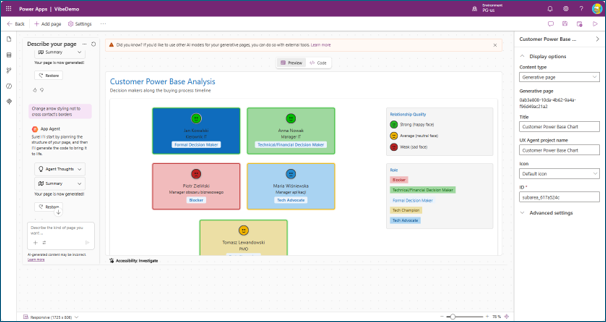
The term “Custom Pages” refers to the ability to embed single-page Canvas Apps within model-driven applications (Power Platform Model-Driven Apps, MDA). As in the previous case, this technology can be replaced by an application created using JavaScript with the help of generative artificial intelligence, known as “generative pages.”In this case, Microsoft has gone a step further and provided an editor that allows you to issue commands to the agent building the solution directly from the make.powerapps.com portal. For more advanced users, it is possible to build the desired functionality within a local environment using the set of skills provided by Microsoft (when using Claude Code) or plugins (for GitHub Copilot).
Power Platform Generative Pages are currently available only in Preview in select regions of the Power Platform.
Power Pages "Classic" vs. SPA
Power Pages Within the Microsoft business applications ecosystem, they serve as a CMS (Content Management System) designed to build portals for our organization’s customers and/or partners, enabling native integration and access to data in the Microsoft Dataverse repository. Unfortunately, the tools for extending the functionality of websites created in this way—despite the positive changes introduced in recent years in the form of Design Studio—remain quite rudimentary compared to other solutions with similar purposes available on the market. A particularly important issue that has long kept architects and designers of solutions built on Microsoft Power Pages awake at night has always been the topic of UI/UX modifications. You’ll agree that customizing or implementing client-side logic using jQuery or Liquid templates sounds quite outdated by today’s standards.
Fortunately, as in the examples discussed earlier, Microsoft came to its senses and made it possible to build a portal using JavaScript and the SPA (Single Page Application) architectural pattern. The entire user interface can now be developed locally within our preferred environment (ideally, of course, using AI agents supported by a dedicated set of skills or extensions) and deployed to the target environment at Power Pages using the Power Platform CLI. The platform’s backend continues to handle access to added data (via a dedicated API) and security. Therefore, we face no greater risk of potential unwanted data leaks in these areas than when using the classic Power Pages engine.
Let’s now return to the question posed in the article’s title. Given the existence of the solutions described above—which, thanks to generative artificial intelligence, significantly reduce the time it takes to build desired functionalities using traditional code—is the popularity of no-code and low-code tools coming to an end? Unfortunately, there is no simple, clear-cut answer in this case. Unfortunately, we’re left with the classic “consultant’s” answer: “It depends” 😊.
In practice, several factors should determine the choice of technology. In my opinion, the most important of these is the expertise of the team that develops—and, in the future, maintains—the functionality being built. We must ask ourselves whether this team will consist of “makers” (that is, people who lack detailed,in-depth technical knowledge in the field of software engineering), or rather programmers who are capable of evaluating or correcting code generated by artificial intelligence (which—let’s be honest—currently falls far short of the ideal in most cases). We must also be aware of the risks associated with artifacts created by AI. Microsoft notes that AI-generated code does not guarantee production readiness or compliance with organizational standards, if any exist.
In some cases, we should also consider licensing issues (new methods of application development based on artificial intelligence mechanisms may result in a higher TCO), the application distribution channel (the aforementioned inability to make Code Apps available as mobile apps or apps embedded within Microsoft Teams), and the desired functionality. Regarding the last of these issues, let’s always keep in mind the fundamental principle of efficiency: we choose tools to fit the goal, not the goal to fit the tools. And in our case, the goal will always be to deliver the desired end result (functionality that meets both functional and non-functional requirements) within the planned timeframe and budget.
Finally, it’s also worth mentioning that there is an intermediate approach involving AI agents that generate classic no-code artifacts. However, that’s a topic for a separate article.
The table below summarizes the key takeaways regarding the choice between traditional no-code/low-code systems and AI-generated code running on the Microsoft Power Platform.
Summary of Conclusions
AI-generated code in the Power Platform allows you to build complex, high-performance applications faster, but it requires developers to evaluate and improve its quality. The choice between low-code and AI-generated code should be based primarily on the skills of the team that will develop and maintain the solution, as well as on licensing, distribution channels, and expected functionality.
Are you facing a similar challenge?


One email a month—just the facts
What's happening with Dynamics, Power Platform, and Copilot—without the marketing hype.