Copilot for Finance

Copilot for Finance It supports financial operations in Excel, Outlook, and Teams using ERP data. We help implement reconciliation, analysis, and communication workflows that reduce manual effort and speed up the closing process.


Financial operations move faster when the team analyzes exceptions instead of manually comparing data.
20 min
savings deposited into an account
1–2 hours → 10 minutes
faster reconciliation
22%
lower process cost
The Challenge

The finance department has the data, but wastes time preparing and reconciling it

Data reconciled manually

Manually comparing spreadsheets, ERP data, and correspondence delays the closing process, increases the number of corrections, and limits the time available for analysis.

Unjustified deviations

The report shows the difference, but not its cause. The analyst has to manually reconstruct the context, which is why the business decision is delayed.

Debt Collection Out of Context

Account balances, payment promises, and emails are scattered, so employees contact customers without a complete history or the proper sense of priority.

Knowledge stays on the worksheets

Rules and explanations are stored in individual files, which increases reliance on experts and makes it difficult to monitor and audit the process.

How It Works

From Financial Data to Clarity and Controlled Action

Finance Agent integrates ERP data with Excel, Outlook, and Microsoft 365 Copilot. The team prepares an analysis, verifies the results, and records the process.

01

Combine the data

Connect your ERP system, specify data sets, and define roles, permissions, and process rules.

02

Prepare an analysis

The agent compares data, detects discrepancies, or establishes the context for receivables and variances.

03

Verify the result

The employee checks the sources, matches, and explanations before making a decision.

04

Record the operation

Approved requests, communications, and statuses return to the controlled process.

THE LOOP CLOSES WITH DATA
Pillars

Copilot for Finance's Two Pillars: Process Efficiency and Financial Control

Less Manual Work in the Financial Cycle

The agent handles the preparation and comparison of data, while the team focuses on exceptions that require evaluation.

Faster approvals
It compares datasets and organizes exceptions for verification.
Less data processing
It helps prepare and standardize data before analysis.
Explained Deviations
It highlights differences and provides context for the financial commentary.
A More Efficient Debt Collection Process
It organizes the context of the receivables before contacting the customer.

Control over sources, decisions, and risk

AI results remain tied to data, permissions, and human verification.
Data Stored in the ERP System
The analysis draws on the agreed-upon financial data and the context of the process.
Visible sources
The user can check the basis for the answer before using it.
User Permissions
Access to data is determined by system configurations and roles.
Measurable Adoption
Usage and results are evaluated against the process's baseline KPIs.
Photos

See how it works

What is a " Copilot for Finance " and the current "Finance Agent"?

Copilot for Finance This is the former name of the solution currently being developed as "Finance" at Microsoft 365 Copilot and "Finance Agent" for finance teams.

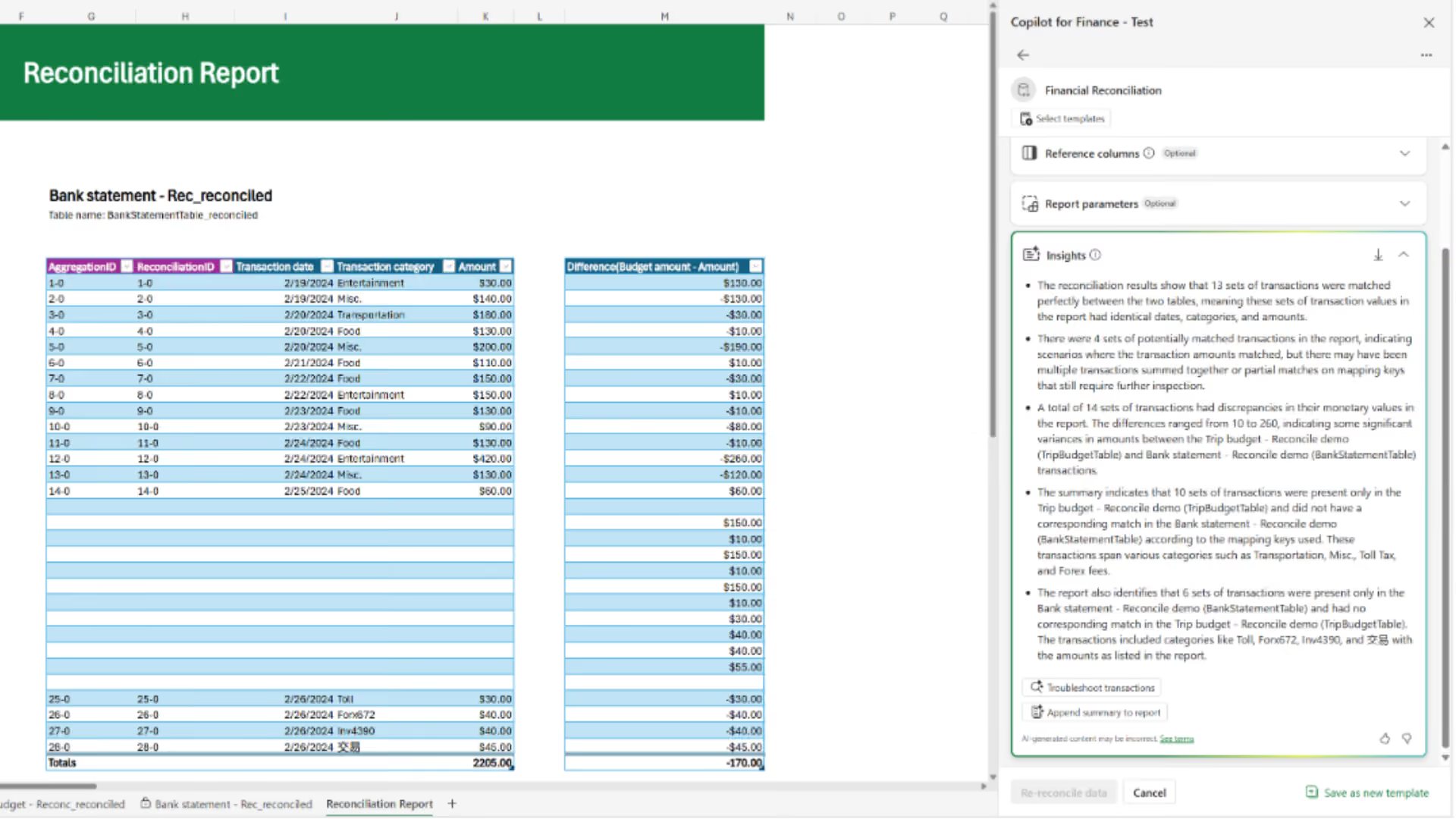
Financial Reconciliation
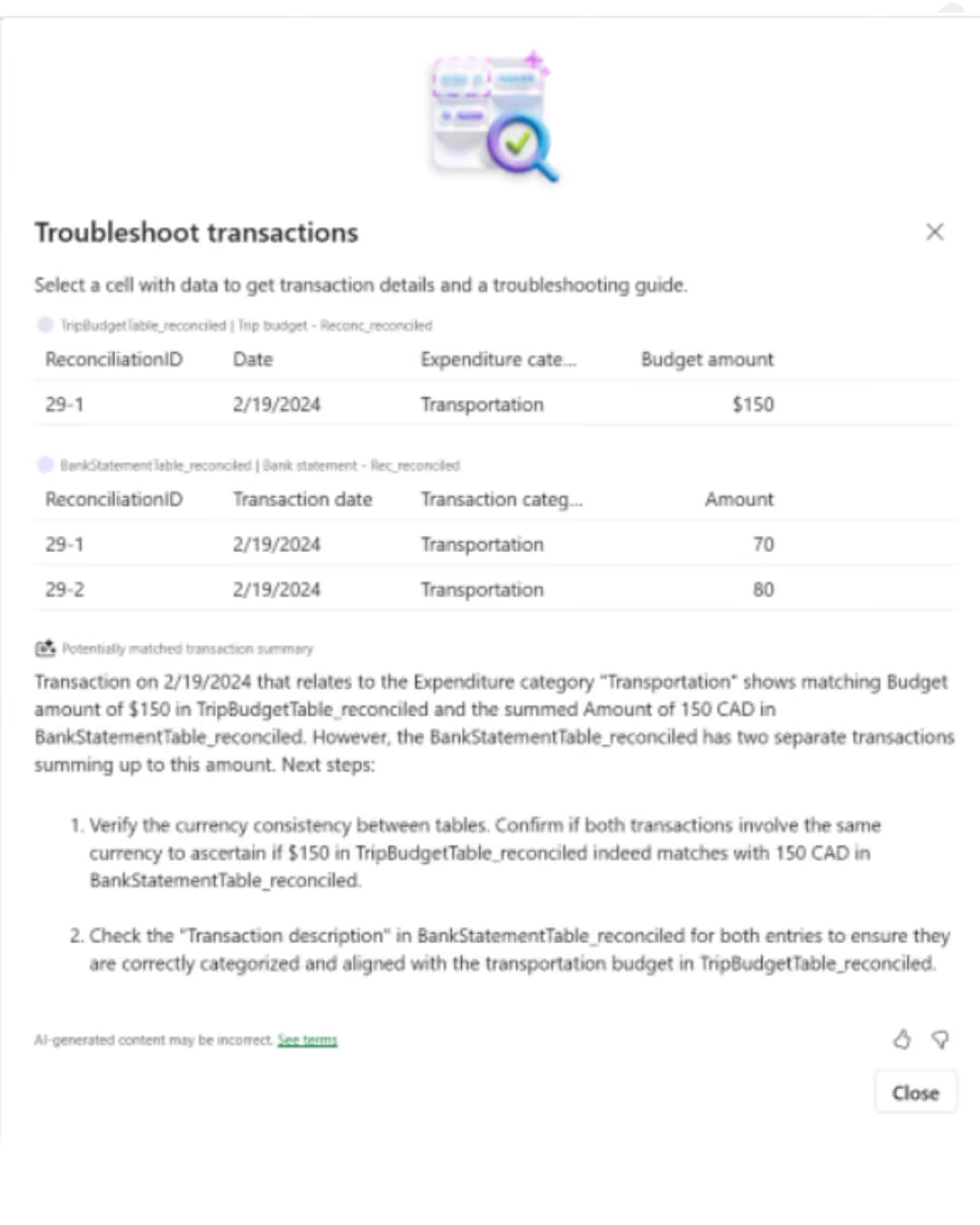
It speeds up the comparison of data sets and draws the team's attention to unresolved exceptions.
Analysis of Variance
It helps identify deviations, develop explanations for them, and prepare a management commentary.
Collections
It combines account balances, contact history, and ERP context to better prioritize actions related to accounts receivable.
Finance Insights
It allows you to ask questions about financial data and prepare decision-making materials more quickly.

Take a look inside

Where does Copilot for Finance offer the most value?

The greatest impact is seen in repetitive processes that combine ERP data, Excel analysis, and Outlook communication.
Accounting, Controlling, and FP&A
Reconciliations, period-end closing, and variance analysis are completed more quickly, and the finance department provides management commentary sooner.
Accounts Receivable, Sales, and Customer Service
The Finance team prioritizes accounts and prepares communications with full context, minimizing friction in customer interactions.
Marketing, Operations, and Production
Understanding the differences between costs and budgets helps you monitor a campaign’s ROI, operating margin, production costs, and plan execution.
What We Optimize

What results have companies using Copilot for Finance

80%

less time for bank reconciliation

>30 hours/month

time saved by the accounting department

1 minute

an agreement instead of six hours

22%

savings on account maintenance costs

FOR WHOM

For which organizations is Copilot for Finance a good fit?

  • The reconciliation process takes place weekly or monthly, and the team still compares the data manually across multiple spreadsheets.
  • The ERP system contains source data, but analysis is performed in Excel and Outlook, causing employees to lose context when switching between tools.
  • Closing, debt collection, and variance analysis are free, and the company can build a KPI database and ensure oversight of AI results.
How We Implement

How We Implement Copilot for Finance : From Process to Measurable Results

Process and Data Audit

We measure baseline time, identify ERP sources, exceptions, risks, and the scenario with the highest potential return.

Setup and Pilot Program

We integrate the sources, configure roles and rules, and then test the process on a controlled group of users.

Adoption and Optimization

We train the team, monitor quality and KPIs, and develop new scenarios once their value has been confirmed.

Numbers, not slides

What Works for Customers Who Have Placed Their Trust in Us

End-to-end projects across various industries. The same Microsoft tools, different results—because each of our clients’ businesses is unique.

They've placed their trust in us

Our employees can now check data in public records directly in Dynamics 365 Sales. This allows us to save nearly 40% of the time we previously spent verifying information.

Krzysztof Sanecki
Vice President of the Board of Directors
·
STERNET
Let's talk about technology

Turn technology into results

Tell us what you want to improve. We'll show you how to use this technology to achieve a specific business outcome.