Power Automate

Microsoft Power Automate automates workflows between applications, data, and users. We help eliminate manual tasks, integrate systems, and reduce process execution times without losing control over exceptions.


An economic study models the impact of Power Automate on returns, time, and labor costs.
200h
annual savings
20%
faster automation
1000+
pre-assembled connectors
The Challenge

Manual transfers prolong the process and obscure its true cost

The status of the case is unclear

Status, exceptions, and responsibility are distributed across various tools, so delays only become apparent after an SLA violation occurs.

Approvals Get Lost in Mailboxes

When a single step is missing, it leads to follow-ups and delays, which lengthens the decision-making cycle, and the team doesn't know who is holding up approval.

The data is entered manually

Information flows between CRM, ERP, Excel, and email, which increases the number of errors, corrections, and the cost of handling a single case.

The process works without meters

The company counts active workflows instead of completed cases, which is why it cannot demonstrate savings or decide what to scale.

How It Works

From a business event to a result recorded in the system

Power Automate It combines triggers, data, rules, actions, and human oversight. Implementation begins with the desired outcome of the process, not with a list of tasks to automate.

01

Purpose

We define the issue, the owner, the expected outcome, the baseline KPIs, and the scope of automation.

02

Data

We combine the sources, roles, connectors, validation, and permissions needed at every step.

03

Flow

We design decisions, approvals, actions, retries, exceptions, and escalation to a human.

04

Measurement

We track the time, errors, effectiveness, cost, and business value of completed cases.

THE LOOP CLOSES WITH DATA
Pillars

Power Automate's Two Pillars: Process Outcomes and Operational Control

Automation That Gets the Job Done

The workflow links data and actions so that the user does not have to coordinate the process manually.

An event instead of a reminder
A process is triggered by a data change, a schedule, a form, or a decision.
Data without rewriting
Connectors transfer the correct record between systems and minimize the need for corrections.
Acceptance in context
The decision-maker receives a complete set of data, a deadline, and an explanation of the consequences of the choice.
An exception involving the owner
The error is assigned to the appropriate role, along with its history and instructions for the next step.

Automation Managed as a Product

Environment, safety, and telemetry make it possible to scale throughput without losing control.

Owner of the result
The business is responsible for KPIs and exceptions, while IT is responsible for the platform and standards.
Controlled Environments
Development, testing, and production separate changes from day-to-day work.
Data Protected by This Policy
DLP, roles, and connectors limit the unwanted flow of information.
Monitoring Since Launch
Errors, time, volume, costs, and savings are measured in a single model.
Photos

See how it works

What Is " Power Automate " in Enterprise Process Architecture?

Microsoft Power Automate is a low-code platform for automating cloud workflows, working in desktop applications, and analyzing process flows.
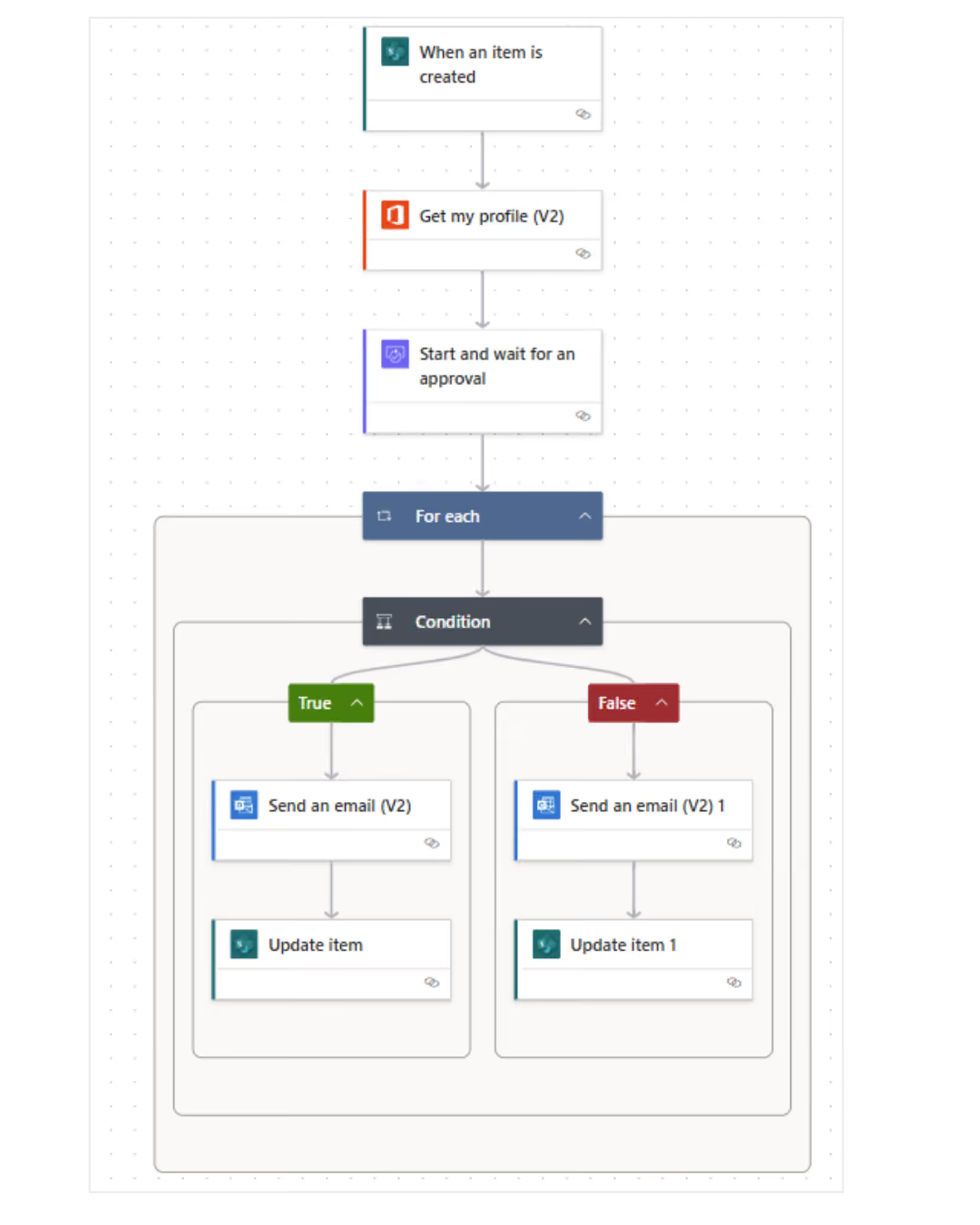
Cloud flows
They integrate events and data from Microsoft 365, Dynamics 365, ERP, CRM, Azure , and third-party services.
Desktop Automation
It handles tasks in apps without an API, reducing the need for manual clicking and data entry.
Process and Task Mining
It identifies variations, bottlenecks, and rework to automate a process with proven potential.
AI and Documents
It classifies content, reads documents, and supports decision-making while maintaining human oversight.

Take a look inside

Where Power Automate shortens the path from incident to decision

The greatest value is created by frequent processes with clear rules, repeatable data, and high costs associated with manual handoffs between roles or systems.

Sales, Marketing, and Customer Service
Qualifies leads, initiates post-campaign actions, updates the CRM, routes inquiries, and ensures responses are provided in accordance with the SLA.
Finance and Internal Processes
It handles invoices, expense approvals, requests, onboarding, and documents, reducing cycle time and the number of corrections.
Operations, Manufacturing, and Logistics
It synchronizes orders, inventory, quality, maintenance, and field incidents, and routes exceptions to the appropriate owner.
What We Optimize

What results have organizations achieved by using Power Automate

12x

faster processing

7% → 0%

reduction in process errors

>120,000 h

time saved annually

3 days → night

A brief analysis of the images

FOR WHOM

In what business situations is Power Automate a valid option?

  • The process requires repetitive data entry, follow-ups, or approvals, and its time and cost increase as the volume of cases grows.
  • CRM, ERP, or Microsoft 365 remains the core system, but the next steps require integration, rules, notifications, or desktop work.
  • The company has many workflows, but it needs unified governance, monitoring, environments, owners, SLAs, and value measurement.

How We Implement

See how it works

Audit and Priority

We map volume, time, exceptions, systems, risks, licenses, and baseline KPIs. We select a process with measurable value and a clear owner.

Implementation and Testing

We build workflows, integrations, permissions, retry mechanisms, and escalations. We test data, performance, security, and error scenarios.

Optimization and Scale

We measure effectiveness, time, errors, cost, and adoption. We expand the backlog, eliminate workarounds, and scale standards to other processes.

Numbers, not slides

What Works for Customers Who Have Placed Their Trust in Us

End-to-end projects across various industries. The same Microsoft tools, different results—because each of our clients’ businesses is unique.

They've placed their trust in us

Our employees can now check data in public records directly in Dynamics 365 Sales. This allows us to save nearly 40% of the time we previously spent verifying information.

Krzysztof Sanecki
Vice President of the Board of Directors
·
STERNET
Let's talk about technology

Turn technology into results

Tell us what you want to improve. We'll show you how to use this technology to achieve a specific business outcome.