

Until recently, working with a CRM system was associated with a screen, a keyboard, and dozens of screens and clicks. Today, thanks to the use of language models and artificial intelligence mechanisms, a scenario is becoming a reality in which a sales representative can dictate a note while on the way from a meeting, a service technician can inquire about a customer’s service history, and a director can check the status of the sales funnel with a single sentence without opening any application. The key to this approach is the concept of headless CRM. In the classic model, a CRM system forms an inseparable whole: data, business logic, and the user interface make up a single product accessed through a dedicated application. In this approach, the presentation layer is separated from the data, business rules, permissions, and processes. The CRM becomes a service accessible via an API, and the interface for communication can be a web form, a mobile app, an AI agent, or the user’s voice. The data and the rules for processing it remain the same, but the way humans interact with the system changes.
It is worth noting that the topic under discussion, despite the reference to Dynamics 365 CE (Customer Engagement) in the title, is not limited to a single product. The foundation here is Microsoft Dataverse, a cloud service on which Microsoft applications (Dynamics 365 Sales, Customer Service, Field Service , and Customer Insights) are built, as well as custom solutions created on the Power Platform. This service provides a unified API, a security model, and automation mechanisms, as well as an MCP (Model Context Protocol) server—an open standard through which AI agents communicate with external data sources and tools. As a result, Dataverse is a perfect example of a technology that can be used in a headless CRM approach.
In the following sections of this article, I will describe possible approaches to implementing a voice chat system that enables interaction with data in a Dataverse repository. Since the content of this article is based on our real-world experience with implementing this solution, it will also mention the “dead ends” we encountered while designing the application. We will also discuss our approach to data security in systems that are used by artificial intelligence agents.
Chapter 1: The Copilot Above All Else!
Since we are a company that has specialized in providing business solutions based on the Microsoft Power Platform for many years, the natural first choice for us was an agent created using the Microsoft Copilot Studio tool. To communicate with the Dataverse repository (which, in this use case, involved logging sales representatives’ activities in the system), we used the MCP protocol and a server available natively within the Dataverse service. The initial version of the solution’s architecture was to look as follows:
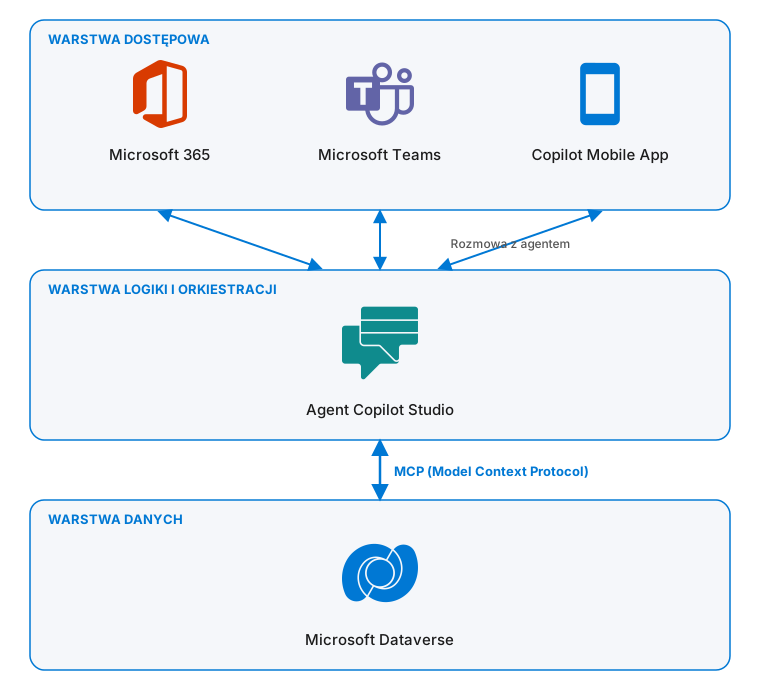
Unfortunately, this approach revealed its fundamental weakness as early as the prototyping stage. None of the default channels where we can publish an agent created using Copilot Studio support voice chat. While the mobile app and the Microsoft 365 portal interface do allow voice messages to be transcribed into text, we considered this an inconvenient workaround. Conversely, when communicating with an agent in the Microsoft Teams mobile app, text-based communication turned out to be the only supported form of conversation, which completely ruled out the possibility of using this client for the use case in question. This is interesting because, in the case of the default Microsoft Copilot agent, voice chat functionality is available “out of the box.”
Chapter 2: How about something a little out of the ordinary?
We attempted to resolve the issue described above using a custom access application and the Azure Speech service, which allows for easy conversion of speech to text (speech-to-text) and text to speech (text-to-speech). Initially, we attempted to build this functionality using a Canvas-type application with embedded controls for recording and playing back audio.
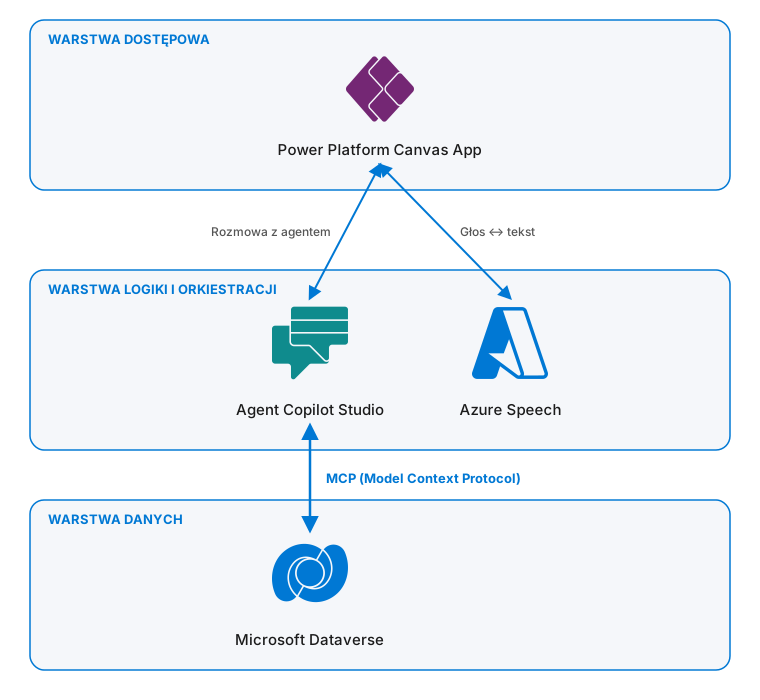
Unfortunately, communication with the service responsible for two-way text-to-speech and speech-to-text conversion via the HTTP protocol proved to be subject to excessive delays. While this solution may work well for one-way communication, in the case of two-way communication, it was difficult to have any kind of smooth conversation with the agent. Unfortunately, applications of this type do not natively support communication via WebSocket or WebRTC protocols, which—unlike individual HTTP requests—maintain a constant, bidirectional connection and allow for real-time audio streaming. Of course, we could easily have worked around this problem using custom code, but we reasoned that since it was supposed to be the main—and, in practice, the only—element of the user interface, we might as well create a custom application for this purpose.
Chapter 3: However, the platform
Given that the low-code mechanisms available in the SaaS model did not meet our expectations in this particular case, we decided to explore the possibilities of using the services available through Microsoft Foundry (formerly Azure AI Foundry). As part of this service, an agent was configured with voice communication enabled (Interaction Mode = Voice). Additionally, a web service was created using .NET 10 technology, which allows the agent’s details to be hidden from the client and potentially expands the capabilities for managing access and configuring the application or business rules for individual user accounts without having to “touch” the resources at Azure. The use of an additional intermediary layer in communication also enables the potential replacement of the agent in the future without requiring changes to the client application’s configuration.
For the front-end layer, we decided in this case to create a PCF (Power Apps Component Framework) control. This technology makes it easy to embed the code we developed (ReactJS, Vite) within various types of Power Platform applications (Canvas, Model-Driven Apps, Power Pages) or to convert it fairly easily to a Power Platform Code App.
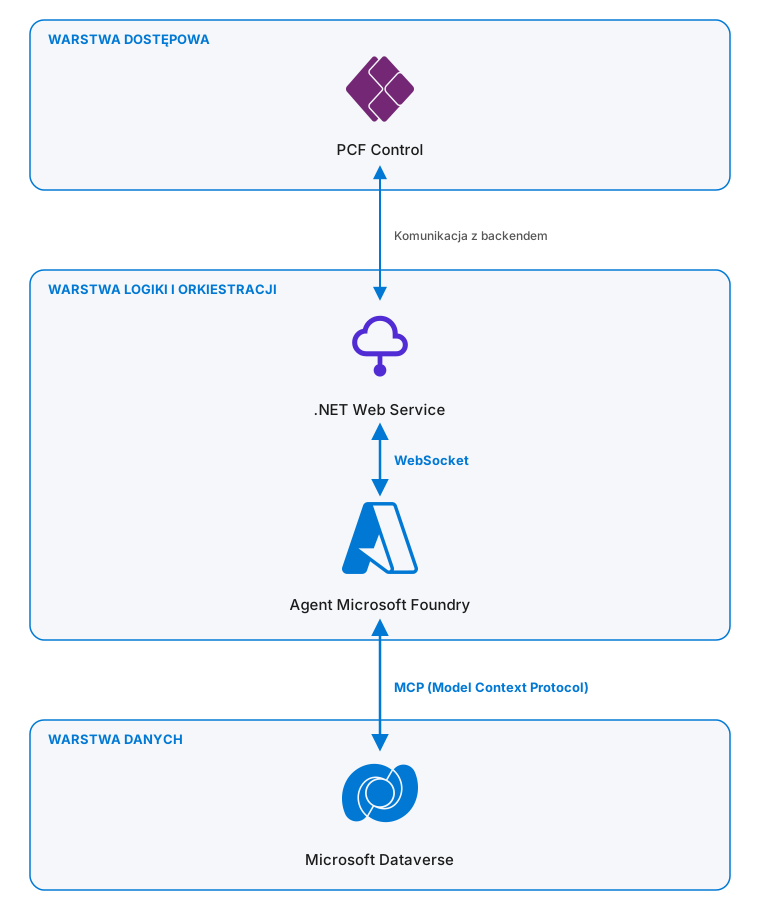
In addition, preliminary estimates for implementing the discussed functionality based on the aforementioned services indicated a potentially lower cost of use than that of a comparable solution built using low-code components. And most importantly, we finally managed to achieve the desired result: a seamless interaction with a custom agent that allows users to create records in Microsoft Dataverse directly from the mobile app.
Chapter 4: Is It Safe?
In terms of security for the solution presented above, user authentication and data access authorization in Microsoft Dataverse are certainly important considerations. For communication between the client application and the backend, we used authentication based on Microsoft Entra ID and the MSAL.js (Microsoft Authentication Library) library, which handles user login and the retrieval of access tokens. This approach allows for controlling access to resources from the cloud directory, prevents users outside the organization from accessing the application, and provides single sign-on (SSO) functionality. In turn, the web service built using .NET technology communicates with the agent using a managed identity Azure (Azure Managed Identity). In this case, access and permission configuration is handled by the web resources Azure and the role-based access control (Azure RBAC) mechanism.
A separate issue is the agent’s access to the Dataverse repository and the data it contains. We would certainly like to avoid a situation in which a voice agent reads data belonging to other customers—even those to whom we nominally do not have access. In our case, the agent connected to Dataverse using its own identity (which again leveraged the Azure Managed Identity mechanism) with limited permissions. However, we can imagine a scenario in which access to Dataverse records is contingent on the actual permissions of the user running the application. In such a case, it will be necessary to use “OAuth Identity Passthrough” authentication and pass the user’s identity information from the client application through the back end all the way to the agent. This is certainly another scenario that we will verify as part of our work on the solution in question.
Summary
Voice communication with a CRM system is no longer a vision of the future but is becoming a viable alternative to the traditional graphical interface. The headless CRM approach, in which Microsoft Dataverse serves as a service that provides data, business logic, and a security model, allows you to freely choose the interaction channel—including a voice-enabled AI agent.
Our experience shows, however, that the path to a working solution does not always lie with the most obvious tools. The agent built in Copilot Studio did not offer a convenient voice conversation in the available publication channels, and the Canvas application integrated with the Azure Speech service proved to be too slow due to communication delays caused by the HTTP protocol. Ultimately, the combination of a voice agent in Microsoft Foundry and custom applications built using .NET and JavaScript/PCF technologies proved to be the most effective. This solution ensured the desired fluidity of conversation and flexibility in the event of a potential agent replacement, and, according to preliminary estimates, also resulted in a lower cost of ownership than a low-code solution.
Security remains an equally important aspect of the project. Authentication based on Microsoft Entra ID, the use of Azure Managed Identity, and limited agent permissions in Dataverse provide a solid foundation. Ultimately, however, it is worth considering passing the user’s identity all the way to the agent (OAuth Identity Passthrough) so that access to data reflects the actual permissions of the person using the application. This is a direction we will pursue in subsequent phases of the project.
Seamless voice interaction with data in Microsoft Dataverse was only made possible by integrating the voice agent in Microsoft Foundry with a custom .NET service and a PCF control, because Copilot Studio does not support voice chat on its channels, and the Canvas app with Azure Speech suffered from excessive latency. When choosing an architecture, security is just as important as the fluidity of the conversation: authentication via Microsoft Entra ID, restricted agent permissions, and, ultimately, passing the user’s identity directly to the agent (OAuth Identity Passthrough).
Are you facing a similar challenge?

One email a month—just the facts
What's happening with Dynamics, Power Platform, and Copilot—without the marketing hype.